
Start here.
How to purchase art
Buy art or commission custom pieces directly from the artists. Find their contact details next to each artwork

How you can support the Artists
Connect with artists on social media. Share their work with your networks. Purchase artwork directly from the artist.
PLEASE READ OUR UPDATE BELOW
IMPORTANT: Previous Virtual Exhibition Access Has Changed
Spatial, the third-party platform previously used to host our immersive virtual exhibitions, discontinued its Creator World hosting service in July 2026. As a result, some of our earlier interactive exhibition spaces are no longer available through the original Spatial embeds.
The Alchemical Art is currently transitioning its virtual exhibitions to a new digital gallery platform. Upcoming exhibitions will launch through the new system and are not affected by the closure of Spatial's Creator Worlds.
You can read Spatial's official announcement regarding the platform closure.
Want to see our previous virtual exhibitions?
Visit our Instagram to explore exhibition videos and highlights. Select an exhibition name from our Story Highlights, or browse our feed for posts featuring past shows.
A guide to exploring the virtual rooms.
Viewing the Exhibition
For the best experience, use your desktop computer. Mobile users, download the free Spatial.io app.
Getting Started
Find the links to the 2 virtual rooms below. Clicking will take you to Spatial.io, where the exhibition is hosted.
Create your avatar on Spatial.io. It's quick, just 30 seconds!
Exploring the Virtual Gallery
Click on artwork images to open full view and see artist info. Each artwork has a link/button to the artist's website or social media
(Refer to the image on the left)For full artist information/bio, check the artist dropdown list on this page.
Engage and Share
Try out dance moves for your avatar or take photos/videos of your work. Use the filming and camera buttons provided. Share your visuals on social media.
(See the filming tools/button in image)
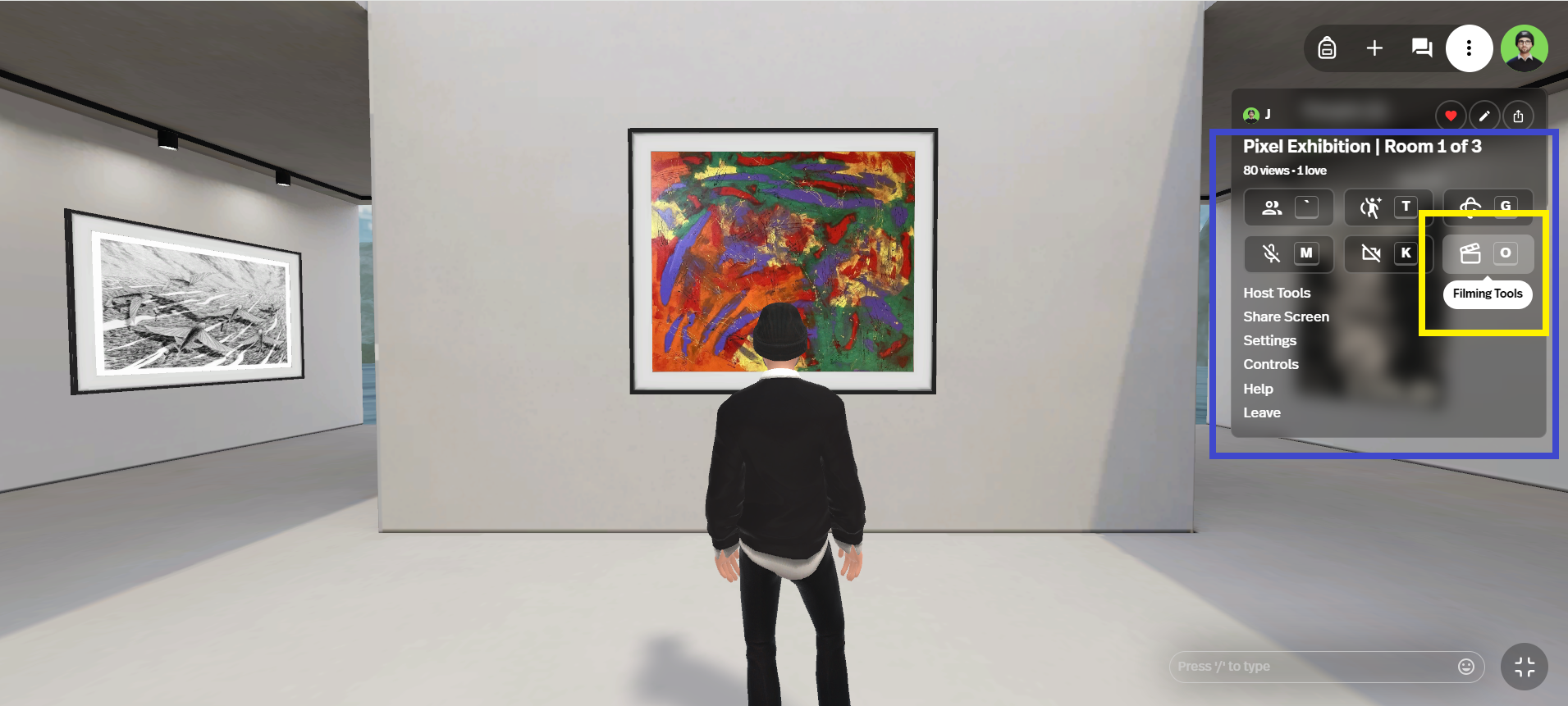
Use the filming/camera tools to record & document exhibition.
(Artists in image: Minya (front), Darya Chebotova (left))

Click on images for full view of artworks.
(Artist in image above: Kat Korossy)